Ad-free launcher for Android TV devices
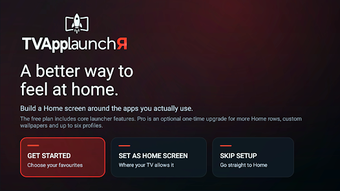
Organizes installed apps into custom rows and exposes favorites, recently opened apps, and an optional weather panel on the home screen. TVAppLaunchR, from Doc Squiffy, is an Android TV and Google TV replacement launcher that prioritizes user-installed applications over content feeds. Key capabilities include a web-based Studio for preparing layouts, multiple user profiles, and an ad-free interface focused on quick access. It suits users who want a calmer, app-first TV experience and owners of older streaming hardware seeking faster navigation.
What it changes about the home screen
TVAppLaunchR replaces content-driven rows with app-first navigation, showing user-installed applications, a favorites row, and a recently opened apps section instead of sponsored recommendations. The launcher is described as ad-free and does not display third-party advertising or streaming recommendations. The Studio web tool lets you prepare and sync layouts from a browser, which changes the workflow for arranging rows and distributing layouts across multiple devices.
How much control it gives over layout and profiles
Users get granular row and profile control: the app supports custom app rows, favorites, and multiple household profiles. The Studio editor adds remote layout management from a web interface, and the app offers font and background personalization as part of its extended feature set. Those options let households assign different quick-access arrangements to separate users without changing the device system UI.
Does it affect system performance or navigation speed?
Designed to be lightweight and improve responsiveness on older hardware, the launcher is noted for a smaller resource footprint compared with content-heavy stock launchers. The source highlights that this lighter design can improve navigation speed on older streaming boxes, and the app runs as a replacement home interface rather than a content layer, which reduces the amount of background content loading typical launchers perform.
How easy it is to install and which devices it supports
Installation works on a broad set of streaming devices: compatible with Android TV and Google TV on Android 7.0 or later, and compatible with Fire OS devices via an official APK sideloading path. Whether it can become the default home screen depends on specific hardware and software, so on some devices you may need to open the launcher manually from the apps list rather than rely on a system default change.
Clear choice for users seeking a calmer, app-centred TV interface
TVAppLaunchR suits viewers who prefer a minimal, ad-free homescreen and who value per-user layouts and a browser-based Studio for remote editing. The app's lightweight design helps older streaming hardware navigate faster, though some devices may not allow it to become the system default launcher. Consider whether the optional Pro features such as custom wallpapers and extra profiles matter for your household before enabling them.